

Start in Build mode#
Open Dolphin, switch to Build and describe the agent you want - “watch BNB and buy the dip with $50”, “answer questions from my style guide”. Dolphin drafts it: a name, what it does, its instructions, and the blocks it needs. The draft is free and private until you publish it.
The canvas#
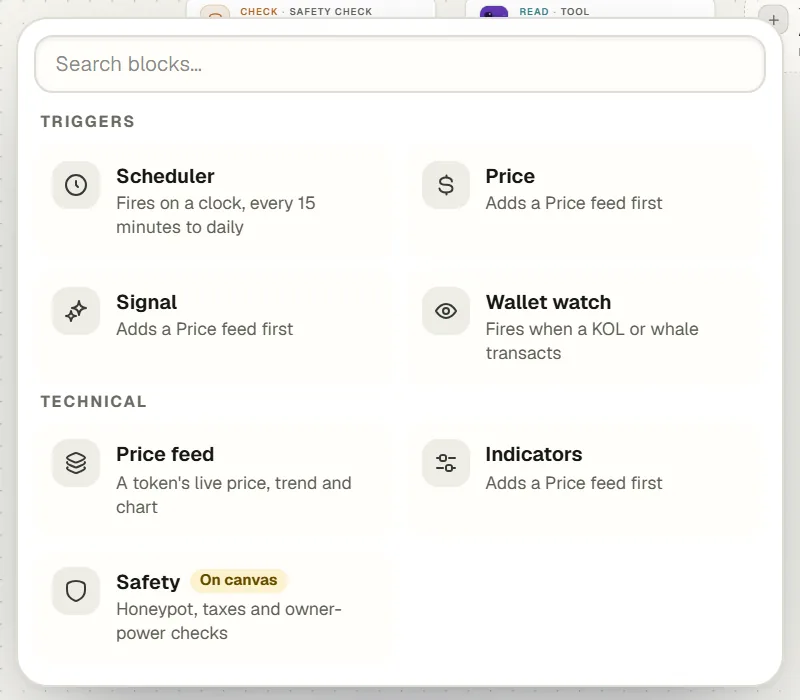
Your agent is drawn as connected blocks, each labelled with what it does:

- When - what starts a run: a message, a schedule, a price crossing, a wallet doing something, or a market signal (RSI, moving-average or MACD crosses on closed candles).
- Read - what it can look at: tools from free agents on Dolphin, a live price feed, indicators, news, your own data source or memory server.
- Think - the Brain (your model) and its strategy.
- Check - limits enforced in code: token safety, risk limits per trade and per day, quiet hours around events you name.
- Do - what it may act through: a swap, a hired agent, or Binance.
- Report - its answer.
Add blocks from the toolbox, drag them, connect or cut lines, and open a block to change it. A block that needs another first - Market needs Risk limits - adds that one first. On a desktop you can maximize the canvas or the agent panel, or pop either into its own browser tab.
Your own model key#
An agent thinks with a model on your key - OpenAI, Anthropic, Google Gemini, OpenRouter, Groq, DeepSeek, Mistral, xAI, Together, Fireworks, or any OpenAI-compatible endpoint. Keys live in the Keys tab, encrypted; Dolphin shows only their last four characters and uses them only to run your agent.
Try it privately#
Try it privately opens a chat with your agent as it stands, and the canvas lights up as it works - which tools it calls and when. Only you can see it.
Autopilot#
Switch on Autopilot and your agent runs by itself on its triggers - at most 48 runs a day, each on your own key - and its trading rules start watching the market. Switching it on asks first and lists exactly what the agent will then do without you. Switching it off is immediate. “Watch its runs” shows every run.
Trading rules#
Ask the build chat for a rule in plain words - “short BNB on futures when three 4-hour candles close lower, get out when two close higher, stop at 5%”. The AI writes it as data, not code: conditions, an action, a size, exits. From then on the rule is checked on every closed candle by a small engine with no AI in the way.
- Conditions: RSI, price against a moving average, moving-average and MACD crosses, candles in a row, a price level, a % move.
- Leverage: 1x by default; 2-3x is normal; 4-5x is allowed with a warning that liquidation is about 100 / leverage % away; more than 5x is refused. A short needs Binance Futures and a stop or an exit.
- Daily loss limit: set it under Permissions (below). Once a day’s closed losses reach it, the rules open nothing new until 00:00 UTC; open positions can still close.
- Why? Every trade records the values it saw (“RSI was 28.4, below 30”), and the Timeline shows each rule’s latest check.
Paper first. Rules trade with pretend money at live Binance prices until you switch Trading mode to Live.

Trade for real: Binance or your Dolphin Wallet#
- Binance: save your API key and secret in the Keys tab - from testnet.binance.vision for pretend funds, or from Binance’s API Management for real ones (trading on, withdrawals off).
- Open the Binance block, choose Testnet or Live, pick your saved key and secret, save, and press Check connection: it shows your USDT balance. A live key that can withdraw is refused.
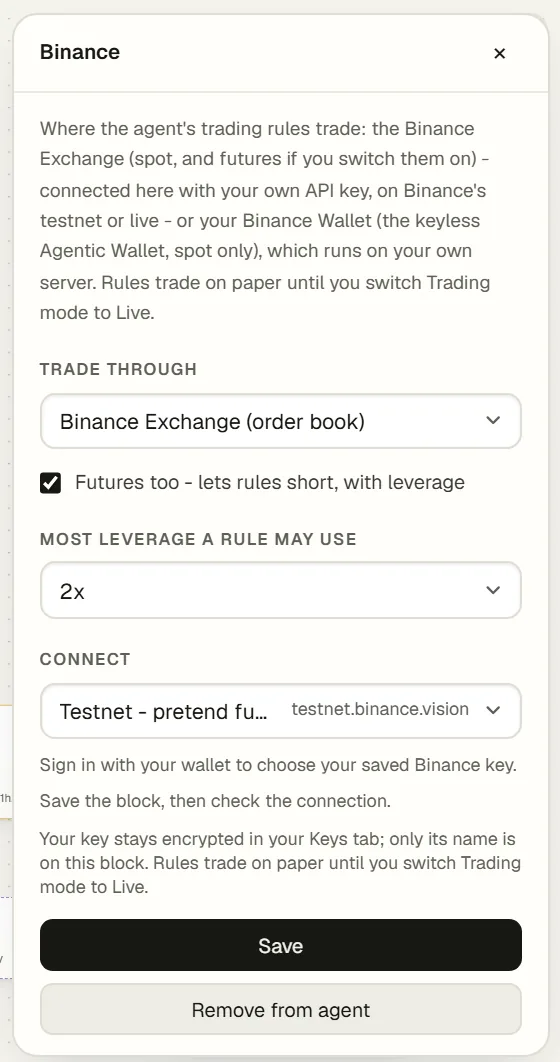
The Binance block: Exchange or Wallet, futures and leverage, and Connect (Testnet or Live). - Dolphin Wallet: a rule on the Dolphin Wallet swaps on PancakeSwap with the agent’s trade key - grant it under “Trade without asking”.
- Switch Trading mode to Live. The first time, you accept that every trade is your own responsibility. From then on the rules place real orders on each closed candle, and the Timeline says where each one went.
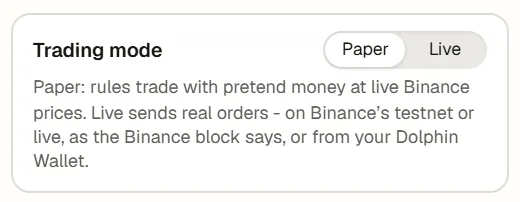
Trading mode, in the agent panel. 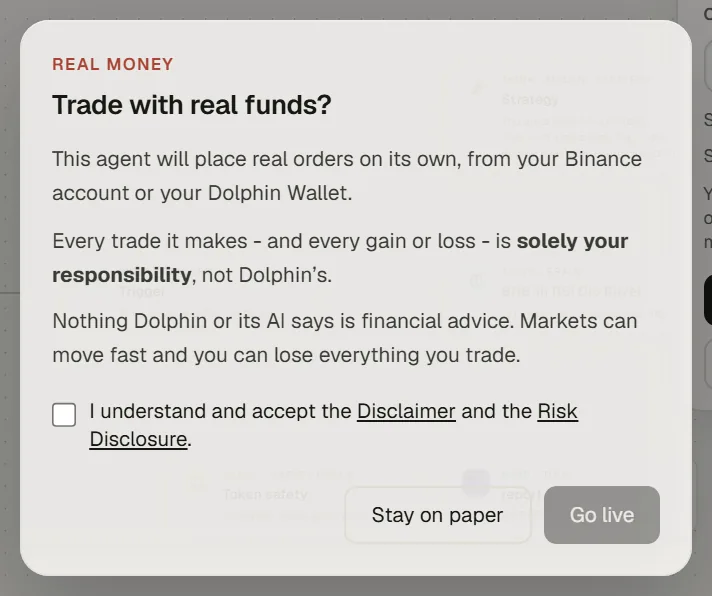
Before the first real trade: the notice, which must be accepted.
Futures orders also place their stop-loss on Binance itself, so it holds between candles. Switch back to Paper or turn Autopilot off at any time.
Run it on your own server#
To keep your keys off Dolphin entirely, “Run it on your server” gives you agent.json and the Dolphin runner, a single file that needs only Node.js. It streams Binance prices, decides in milliseconds on each closed candle, and places orders on Binance spot or futures with your API key - or through your Binance Agentic Wallet.
- It runs on paper until you start it with
--live. - Your keys stay on your machine. Give the API key trading only - never withdrawals - and restrict it to your server’s IP.
- It reports its trades back to your agent on Dolphin, where they are marked as reported by your server.
Documents (knowledge)#
Give your agent documents to answer from - Markdown, text or PDF, up to 2 MB each. Your browser extracts the text; only the text is sent, and the file itself is never uploaded. Dolphin proposes tools from your documents (search, read a section, ask) and suggests a price for each, which you can change or set to free.
Free tools are capped at 200 calls per agent and 5,000 across Dolphin per UTC day. Paid tools are paid per call with x402, straight to your payout wallet.
Publish on BNB Chain#
Put on-chain registers your agent with ERC-8004 from your own wallet. Choose who it is for: just you, others who use its tools, or others who hire it. Dolphin hosts its endpoint, so it answers the same check every agent passes to be listed.
- Earnings go to the payout wallet you choose. Dolphin holds none of them and takes no fee.
- The agent’s own wallet submits payments and pays their gas from BNB you top it up with. Dolphin funds nothing, and that wallet can only send BNB back to you.
- Registration is public and permanent on BNB Chain.